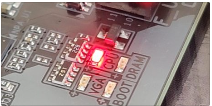
The image shows a motherboard debug LED lit up next to the label CPU, indicating a hardware issue with your processor during the Power-On Self-Test (POST).
Potential Causes Power Delivery: The CPU power cable (8-pin EPS) is loose or unplugged.
BIOS Version: The motherboard BIOS does not support the installed CPU model out of the box.
Physical Damage: Bent pins inside the motherboard socket or on the CPU itself.
Improper Seating: The processor is not locked down correctly in its socket.
Hardware Failure: The CPU or the motherboard’s power delivery system is dead.
Initial Troubleshooting Steps Check
Power Cables: Ensure the 4+4 pin or 8-pin CPU power cable at the top left of the motherboard is pushed completely in.
Reseat the CPU: Remove the cooler, lift the CPU out, check for bent pins, and reinstall it firmly.
Clear CMOS: Reset the motherboard BIOS by removing the coin-cell battery for 5 minutes with the PC unplugged.
Flash BIOS: Use the “BIOS Flashback” button on the rear I/O (if available) to update the motherboard firmware via a USB drive.
If it still does not work, then bring it to our skilled computer engineer, and we will diagnose it for you and provide you with an estimate for repair.
We are located at 1829 Lakewood Ramch Blvd, Bradenton, Florida 34211, USA. Business name: Computers Repair Plus Electronics. Phone number 9415676431