A laptop that becomes unusually hot can be more than just uncomfortable to use. Excessive heat can affect performance, cause unexpected shutdowns, damage internal components, and shorten the lifespan of your device.
Many users notice warning signs before a major problem occurs. Your laptop may become slower, the fan may run constantly, or the system may shut down during demanding tasks. These symptoms often indicate that your laptop is struggling to manage heat properly.
Understanding why your laptop is overheating can help you take the right steps before the problem becomes more serious. Whether you are dealing with an overheating laptop for work, school, gaming, or everyday use, identifying the cause is the first step toward finding the right solution.
Need help diagnosing a laptop that is running too hot? Contact Computers Repair Plus or call (941) 567-6431 to discuss your laptop issue and explore possible repair options.
Why Does a Laptop Overheat?
Laptops are designed with compact cooling systems that include fans, heat sinks, and thermal materials to move heat away from important components. Over time, these systems can become less effective due to dust buildup, aging components, software demands, or hardware problems.
Unlike desktop computers, laptops have limited internal space, which means even small cooling issues can have a noticeable effect on performance.
Common Causes of Laptop Overheating
1. Dust Buildup Blocking Airflow
One of the most common reasons laptops overheat is restricted airflow. Dust and debris can collect inside the cooling system and prevent fans from moving enough air through the device.
When airflow is blocked:
- Internal temperatures increase
- Fans work harder
- Performance may decrease
- The laptop may shut down to protect itself
Regular cleaning and proper maintenance can help prevent dust-related overheating problems.
2. A Failing or Overworked Cooling Fan
The cooling fan plays an important role in keeping your laptop at a safe operating temperature. If the fan becomes damaged, slows down, or stops working correctly, heat can build up quickly.
Signs of a possible fan issue include:
- Loud or unusual fan noises
- Fan constantly running at high speed
- Laptop becoming hot during simple tasks
- Sudden shutdowns
In some situations, fan repair or replacement may be needed to restore proper cooling.
3. Old or Dried Thermal Paste
Thermal paste helps transfer heat from the processor to the cooling system. Over time, this material can dry out and become less effective.
When thermal paste no longer transfers heat properly:
- The processor may run hotter
- The fan may work harder
- Performance may decrease under load
A professional thermal paste replacement can improve heat transfer when aging thermal material is contributing to overheating.
4. Running Demanding Programs
Modern software can place significant demands on laptop hardware. Activities such as gaming, video editing, graphic design, and running multiple applications can generate more heat.
A laptop that performs well for basic tasks may struggle with heavier workloads if the cooling system or hardware is not designed for those demands.
5. Blocked Ventilation Areas
Using a laptop on soft surfaces such as beds, couches, or blankets can restrict airflow. Many laptops use bottom vents to pull in cool air, and blocking these openings can increase temperatures.
For better airflow:
- Use your laptop on a hard, flat surface
- Keep ventilation openings clear
- Avoid covering cooling areas
6. Background Programs Using Too Many Resources
Sometimes overheating is caused by software running in the background. Programs that constantly use the processor can increase heat even when you are not actively doing demanding tasks.
Possible causes include:
- Too many startup programs
- Background updates
- Unwanted applications
- Malware activity
Professional Virus & Malware Protection and Removal can help identify whether harmful software is affecting system performance and causing unnecessary resource usage.
Warning Signs Your Laptop May Be Overheating
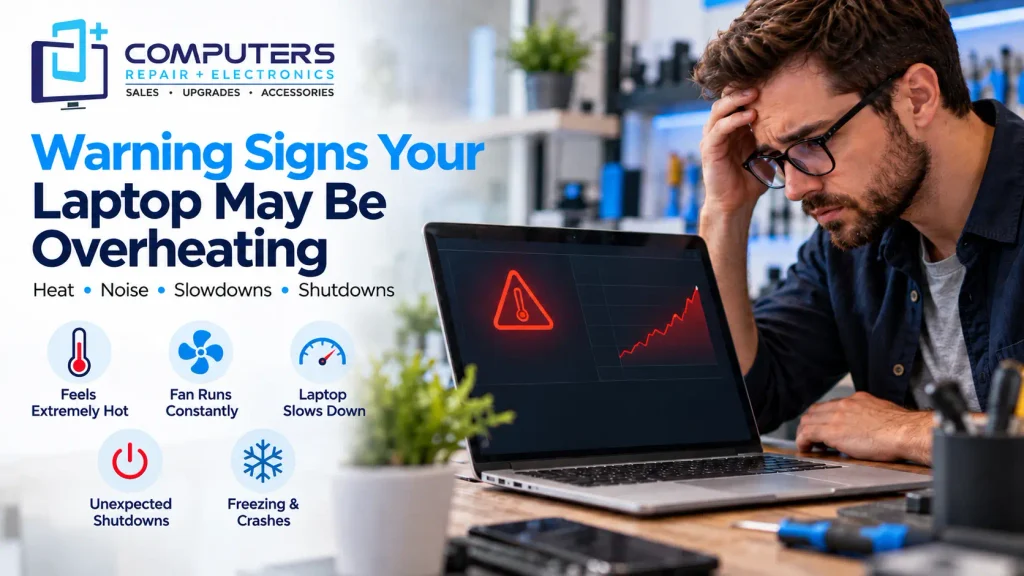
Recognizing early warning signs can help prevent more serious damage.
Your Laptop Feels Extremely Hot
A warm laptop during normal use is expected, but excessive heat around the keyboard, bottom panel, or charging area may indicate a cooling issue.
The Fan Runs Constantly
If the fan is always loud even when performing simple tasks, the cooling system may be working harder than normal.
Your Laptop Slows Down
Many laptops automatically reduce performance when temperatures become too high. This process helps protect components but can make your device feel unusually slow.
Unexpected Shutdowns or Restarts
A laptop may shut down automatically when internal temperatures reach unsafe levels. This protective feature helps prevent hardware damage.
Freezing or Performance Problems
Overheating can contribute to system instability, including freezing, crashes, and programs becoming unresponsive.
What Should You Do If Your Laptop Is Overheating?
Before seeking repair, there are several steps you can try:
Improve Airflow
Make sure your laptop is placed on a hard surface and that vents are not blocked.
Close Unnecessary Programs
Reduce system load by closing applications you are not using.
Keep Software Updated
Updates can sometimes improve system stability and fix performance-related issues.
Avoid Ignoring Repeated Overheating
A laptop that frequently overheats should not be ignored. Continued heat exposure may affect internal components over time.
When Should You Consider Professional Laptop Overheating Repair?
Some overheating problems can be solved with basic maintenance, but others require professional diagnosis.
Professional laptop overheating repair can help identify issues involving:
- Cooling fan problems
- Thermal paste condition
- Internal dust buildup
- Hardware failures
- Performance-related issues
For customers looking for laptop repair Bradenton, understanding the actual cause of overheating is important. Replacing parts without proper diagnosis may not solve the underlying problem.
A technician can inspect the system and determine whether cleaning, repair, upgrades, or replacement is the most practical option.
Can Laptop Overheating Be Fixed or Should You Replace the Laptop?
Overheating does not always mean your laptop needs to be replaced.
Repair may be a good option when:
- The cooling system needs maintenance
- A fan or component can be replaced
- The laptop still meets your needs
Replacement may make more sense when:
- The laptop is significantly outdated
- Multiple components are failing
- Repair costs are not practical compared to a new device
If replacement becomes the better option, New Computer Sales can help customers choose a system based on their actual usage requirements.
For users who need a higher-performance machine for specific tasks, a Custom Built PC may also be worth considering.
Protect Your Data Before Major Repairs
When a laptop experiences overheating issues, it is important to consider your important files and personal data.
Hardware problems can sometimes lead to storage failures or unexpected system issues. Keeping backups can reduce the risk of losing important documents, photos, and other files.
Professional Data Recovery & Backup services can help when you need assistance protecting or recovering important information.
Frequently Asked Questions
Can overheating damage my laptop permanently?
Yes, repeated overheating can affect internal components over time. Addressing heat problems early can help reduce the risk of hardware damage.
Why does my laptop overheat even when I am not doing anything?
A laptop may overheat during light use because of background programs, malware, blocked airflow, fan problems, or cooling system issues.
How do I know if my laptop fan needs repair?
Signs of a possible fan problem include unusual noises, constant high-speed operation, excessive heat, and shutdowns caused by temperature issues.
Does replacing thermal paste help an overheating laptop?
Thermal paste replacement can improve heat transfer between the processor and cooling system when old or dried thermal material is contributing to overheating.
Can I clean my laptop cooling system myself?
Basic external cleaning is usually safe, but opening a laptop requires care. Incorrect handling can damage internal components, so professional help may be useful for deeper cleaning.
Is an overheating laptop worth repairing?
It depends on the cause of overheating, the laptop’s condition, and repair requirements. Many overheating issues can be addressed through maintenance or component repair.