If your computer takes several minutes to start, programs open slowly, or everyday tasks feel frustratingly delayed, you may not need to replace the entire device. For many older computers, upgrading from a traditional hard drive (HDD) to a solid-state drive (SSD) can make a noticeable difference in performance.
Many customers searching “is SSD upgrade worth it” are trying to decide whether investing in an upgrade is a better option than buying a new computer. The answer depends on the age of the device, its current condition, and how you use it.
An SSD upgrade can often improve startup speed, application loading times, and overall responsiveness. However, it is not always the right solution for every computer problem.
Computers Repair Plus helps customers in Bradenton, Lakewood Ranch, Sarasota, and surrounding areas understand their computer performance issues and choose practical solutions based on their needs.
If your older computer feels slow and you are unsure whether an SSD upgrade can help, contact Computers Repair Plus or call (941) 567-6431 to discuss your upgrade options.
What Makes an SSD Upgrade Improve Computer Performance?
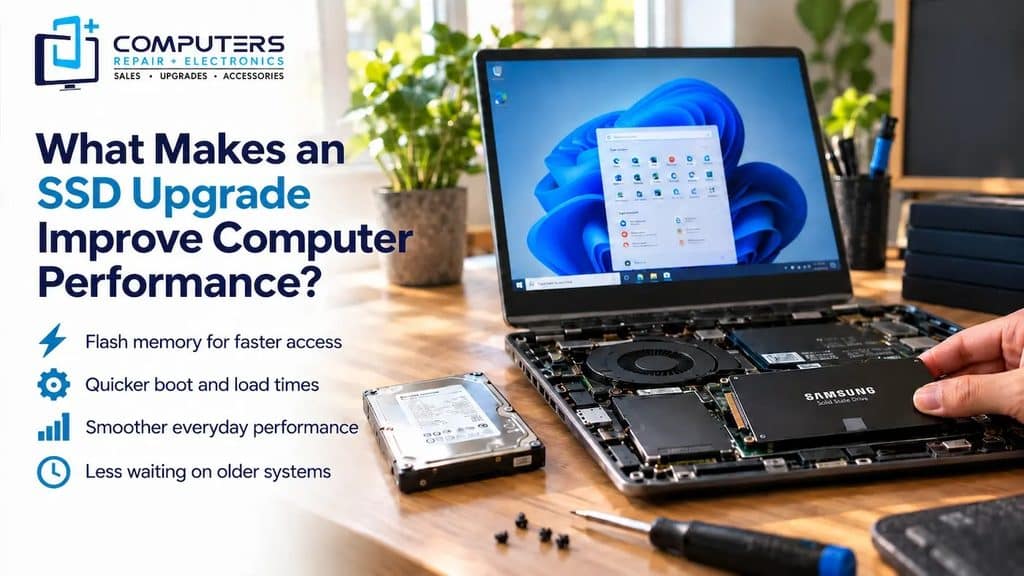
A traditional hard drive stores data using moving mechanical parts. An SSD uses flash memory, which allows it to access data much faster.
This difference can affect many everyday computer tasks.
With an SSD upgrade, users may experience improvements such as:
- Faster computer startup
- Quicker program loading
- Improved file access speed
- Better overall system responsiveness
- Less waiting during everyday tasks
For many older computers, the storage drive is one of the biggest performance limitations. Replacing an older hard drive with an SSD can sometimes provide a noticeable improvement without replacing the entire system.
Signs Your Older Computer May Benefit From an SSD Upgrade
Not every slow computer needs a complete replacement. Some performance issues are related to the storage drive rather than the entire machine.
Your computer may benefit from an SSD upgrade if you notice:
Slow Startup Times
If your computer takes a long time to reach the desktop after turning it on, an older hard drive may be slowing down the process.
Programs Take Too Long to Open
Applications that freeze or take several seconds to load may perform better with faster storage.
Frequent Delays During Everyday Tasks
Simple activities such as opening files, browsing the internet, or switching between programs should not feel unnecessarily slow.
Older Hard Drive Performance
Traditional hard drives can become slower as they age. If your computer hardware is still suitable for your needs, upgrading the storage may extend its useful life.
For customers looking for SSD upgrade Bradenton services, a professional evaluation can help determine whether an SSD is the right improvement for their specific computer.
When Is an SSD Upgrade Worth It?
The value of an SSD upgrade depends on the condition of the computer and what you expect from it.
An SSD upgrade is often worth considering when:
- The computer still meets your daily needs
- The processor and memory are sufficient
- The main issue is slow performance
- You want a faster experience without replacing the device
For example, an older laptop used for web browsing, email, documents, and everyday tasks may still be useful after a storage upgrade.
However, an SSD upgrade will not solve every problem.
If the computer has outdated hardware, failing components, or performance limitations beyond storage speed, other upgrades or replacement options may need to be considered.
SSD Upgrade vs Buying a New Computer
One of the biggest decisions customers face is whether to improve their current computer or replace it completely.
Choose an SSD Upgrade When:
- Your computer still works reliably
- You are satisfied with its features
- Performance is the main issue
- You want to improve speed without purchasing a new device
Consider Replacement When:
- The computer no longer supports your needs
- Multiple hardware components are outdated
- Repair or upgrades would not provide enough improvement
- You need significantly better performance
In some situations, a new system may be a better long-term investment. Customers who need a completely different setup may want to explore options such as New Computer Sales or a Custom Built PC depending on their requirements.
The right choice depends on your current computer, your goals, and how you use the device.
What About Laptop SSD Installation?
Laptop upgrades can be more complicated than desktop upgrades because laptops often have limited space and different hardware configurations.
A proper laptop SSD installation involves more than simply replacing a storage drive. Important considerations may include:
- Choosing a compatible SSD
- Protecting important files before the upgrade
- Moving or reinstalling the operating system
- Ensuring the computer recognizes the new drive correctly
Professional installation can help reduce the risk of data loss or installation issues, especially when important files are stored on the existing drive.
Why Professional Computer Repair & Upgrades Can Help
Before upgrading an older computer, it is important to understand whether an SSD will actually solve the performance problem.
A slow computer may also be affected by:
- Limited memory
- Software issues
- Hardware problems
- Operating system problems
- Other aging components
Professional Computer Repair & Upgrades can help identify the actual cause of slow performance and determine whether an SSD upgrade, another upgrade, or a replacement option makes the most sense.
A proper evaluation helps customers avoid spending money on upgrades that may not address the real issue.
What Should You Do Before Upgrading to an SSD?
Before making hardware changes, consider a few important steps.
Back Up Important Files
Before replacing a storage drive, protecting important documents, photos, and other files is an important part of the process.
Understand Your Computer’s Condition
An SSD upgrade may improve speed, but it is useful to know whether other components are still suitable for your needs.
Consider Your Long-Term Goals
Think about how long you plan to use the computer and what tasks you need it to handle.
A small upgrade may be the right choice for some users, while others may benefit more from investing in a newer system.
How Computers Repair Plus Helps With Computer Upgrades
Choosing the right computer upgrade can be confusing when you are unsure what is causing performance problems.
Computers Repair Plus helps customers in Bradenton, Lakewood Ranch, Sarasota, and surrounding areas understand their computer issues and choose practical solutions.
With more than 19 years of experience, Computers Repair Plus helps customers address computer-related problems through repair services, upgrades, and guidance based on their specific needs.
Whether your computer needs an SSD upgrade, laptop SSD installation, or another performance improvement, understanding the cause of the slowdown is the first step.
If your older computer feels slower than it should, Computers Repair Plus can help you determine whether an upgrade is the right solution. Call (941) 567-6431 or contact the team today.
Frequently Asked Questions About SSD Upgrades
Is an SSD upgrade worth it for an older computer?
An SSD upgrade can be worth it if the computer is still suitable for your needs and the main issue is slow performance caused by an older hard drive.
How much faster will my computer be after an SSD upgrade?
The improvement depends on the computer’s existing hardware and the tasks you perform. Many users notice faster startup times and quicker program loading after moving from an HDD to an SSD.
Can an SSD upgrade make an old laptop faster?
Yes, an SSD upgrade can improve many aspects of laptop performance, especially when slow storage is the main limitation. However, other hardware limitations may still affect speed.
Will upgrading to an SSD delete my files?
Replacing a storage drive requires careful handling of your data. Backing up important files before an upgrade helps protect your information.
Should I upgrade my SSD or buy a new computer?
The right choice depends on your computer’s age, condition, and your performance needs. An upgrade may be practical for some systems, while replacement may make more sense for others.
Can a computer repair professional install an SSD?
Yes. Professional Computer Repair & Upgrades services can help with SSD compatibility, installation, and ensuring the upgraded system works properly.