Few things are more frustrating than working on an important task when your computer suddenly freezes, becomes unresponsive, or crashes without warning. A frozen screen, slow response, or unexpected restart can interrupt your work, risk losing important files, and make you question whether your computer is failing.
If your computer keeps freezing, the cause is not always obvious. Sometimes the problem is related to software, such as outdated drivers, system errors, or unwanted programs. In other situations, hardware issues like overheating, failing storage, or memory problems may be responsible.
Understanding why your computer is freezing is the first step toward finding the right solution. At Computers Repair Plus, we help customers in Bradenton, Lakewood Ranch, Sarasota, and surrounding areas understand computer problems and choose practical repair or upgrade options based on their needs.
Need help identifying why your computer freezes or crashes? Contact Computers Repair Plus or call (941) 567-6431 to discuss your issue and find the right next step.
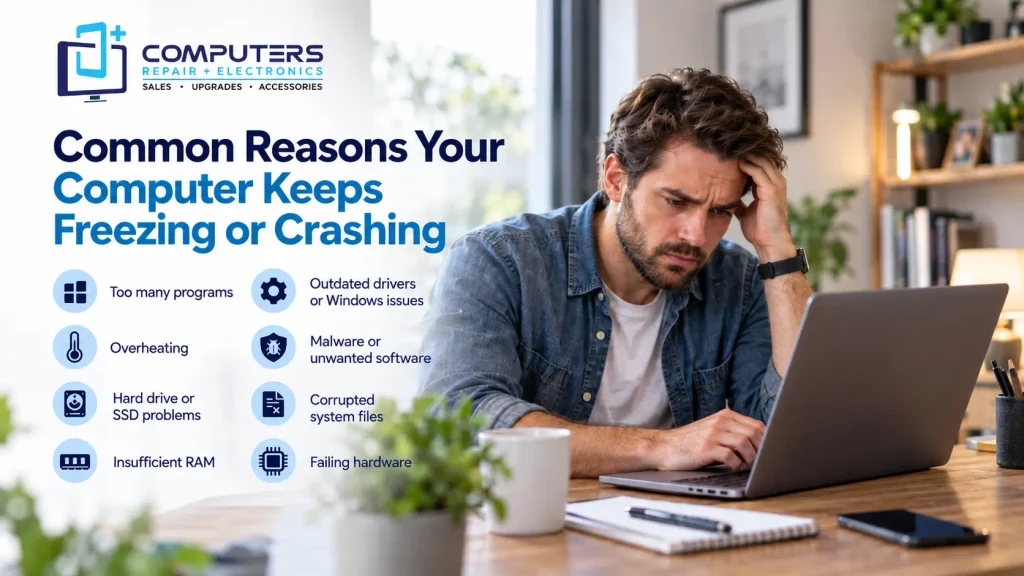
Common Reasons Your Computer Keeps Freezing or Crashing
A computer freeze usually happens when the system cannot complete a task properly. The cause may be temporary, or it may indicate a problem that needs attention.
1. Too Many Programs Using System Resources
Every program running on your computer uses resources such as RAM, processor power, and storage access. When too many applications run at the same time, your system may struggle to keep up.
Common situations include:
- Having many browser tabs open
- Running demanding software with limited hardware
- Multiple programs starting automatically
- Background applications using memory
When your computer does not have enough available resources, it may become slow, freeze temporarily, or stop responding completely.
What you can try:
- Close programs you are not actively using
- Restart your computer regularly
- Disable unnecessary startup applications
If freezing continues, the issue may require a deeper system check.
2. Overheating Can Cause Freezes and Crashes
Computers generate heat during normal operation. Cooling systems, including fans and ventilation areas, help maintain safe temperatures.
When a computer overheats, it may slow itself down to protect internal components. In more serious situations, it may freeze, shut down, or restart unexpectedly.
Common causes of overheating include:
- Dust buildup inside the computer
- Blocked air vents
- Fan problems
- Poor airflow around the device
A laptop freezing during gaming, video editing, or other demanding tasks may sometimes be related to heat management.
3. Hard Drive or SSD Problems
Storage problems are another common reason for PC crashing and system instability.
A failing storage drive can cause:
- Slow loading times
- Programs freezing when opening files
- System crashes
- Missing or corrupted files
If you notice unusual noises from a traditional hard drive, frequent errors, or sudden performance changes, it is important to protect your data.
Professional Data Recovery & Backup support can help evaluate storage problems and protect important information before a drive failure becomes worse.
4. Insufficient RAM or Memory Problems
RAM allows your computer to handle active tasks. When your system does not have enough memory, it may struggle with multitasking.
Signs of RAM-related issues include:
- Programs freezing when multiple applications are open
- Slow performance during normal tasks
- Random crashes
- The computer becoming unresponsive
A memory upgrade may improve performance, but it depends on your computer’s hardware compatibility and overall condition.
5. Outdated Drivers or Windows Issues
Your operating system communicates with hardware components through drivers. If drivers become outdated, corrupted, or incompatible, they can cause stability problems.
Windows-related issues may include:
- Frequent freezing after updates
- Blue screen errors
- Hardware not responding correctly
- Programs crashing unexpectedly
Professional Windows repair can help identify system problems and restore proper operation when basic troubleshooting does not solve the issue.
6. Malware or Unwanted Software
Malicious programs can affect computer performance and stability. Some unwanted software runs in the background, consumes system resources, changes settings, or creates security risks.
Signs of possible malware issues include:
- Unexpected slowdowns
- Frequent pop-ups
- Unknown programs appearing
- Browser behavior changes
- Computer freezing without an obvious reason
Professional Virus & Malware Protection and Removal can help identify threats, remove harmful programs, and improve system security.
7. Corrupted System Files
Important operating system files can sometimes become damaged due to improper shutdowns, failed updates, software conflicts, or hardware problems.
When system files are corrupted, you may experience:
- Programs failing to open
- Repeated crashes
- Slow startup
- Random freezing
Repairing system files requires careful troubleshooting because incorrect changes can create additional problems.
8. Failing Hardware Components
Sometimes freezing is caused by physical hardware problems rather than software.
Possible hardware-related causes include:
- Failing RAM
- Storage drive failure
- Power supply issues
- Motherboard problems
- Damaged internal components
A professional diagnosis can help determine whether repair is possible or whether replacement makes more sense.
What Should You Do When Your Computer Freezes?

When your computer becomes unresponsive, try these basic steps:
Wait and Check Activity
Sometimes a computer appears frozen because it is completing a demanding task. Give it a few moments before forcing a shutdown.
Close Frozen Programs
If possible, use your system’s task management tools to identify programs that are not responding.
Restart the Computer
A restart can temporarily resolve some software-related freezes. However, repeated freezing usually indicates an underlying problem that needs attention.
Avoid repeatedly forcing shutdowns because unexpected power loss can sometimes contribute to file corruption.
When Should You Consider Professional Computer Repair?
Occasional slowdowns may be normal, but frequent freezing or crashing should not be ignored.
Professional Computer Repair & Upgrades can help diagnose issues such as:
- Hardware failures
- Performance problems
- Operating system errors
- Upgrade opportunities
- Security issues
A proper diagnosis helps you understand whether your computer needs repair, maintenance, an upgrade, or replacement.
For customers searching for computer repair Bradenton, understanding the actual cause of the problem is more valuable than replacing parts unnecessarily.
Should You Repair Your Computer or Replace It?
A freezing computer does not automatically mean you need a new device.
Repair or upgrades may be a good option when:
- The hardware is still suitable for your needs
- A specific component has failed
- Performance can be improved with upgrades
Replacement may make more sense when:
- The computer is outdated
- Repairs are extensive
- The device cannot support your required programs
For customers who need a new system, New Computer Sales can help identify a computer that matches their actual usage requirements.
For users with specific performance needs, such as gaming, professional work, or specialized tasks, a Custom Built PC may also be worth considering.
Frequently Asked Questions
Why does my computer keep freezing randomly?
Random freezing can happen because of overheating, software conflicts, malware, insufficient memory, failing hardware, or corrupted system files. Finding the exact cause requires looking at the symptoms and system conditions.
Why does my laptop keep freezing but not crashing?
A laptop freezing without fully crashing may be caused by limited resources, overheating, storage issues, outdated drivers, or background programs using too much memory.
Can a virus cause my computer to freeze?
Yes. Malware can consume system resources, interfere with normal operations, and cause performance problems, including freezing and crashes.
How do I fix a computer that keeps crashing?
Start by checking for software updates, removing unnecessary programs, scanning for malware, and monitoring storage and system performance. If crashes continue, professional diagnosis may be needed.
Is it worth repairing a computer that keeps freezing?
It depends on the cause of the problem, the age of the computer, and repair requirements. Some issues can be fixed with maintenance or upgrades, while older systems may be better replaced.
Can overheating permanently damage my computer?
Repeated overheating can affect hardware performance and reliability. Keeping the cooling system clean and addressing heat issues early can help protect your device.